Inference Basic Flash Sample Application
Description
The Inference Basic Flash Sample application estimates inference parameters of your TFLite models by running the model directly from flash. It reports key error metrics such as MSE, MAE, and PSNR to help evaluate model accuracy for deployment.
The latest example structure uses a common application source tree with board-specific hardware setup kept under hw/<BOARD>/. For this app:
Common application sources such as
main.c,inference_basic_flash_sample_app.cc, andinference_basic_flash_sample_app.hppstay in the app root.Application defconfigs are stored under
configs/.Board and hardware-specific setup is selected from
hw/<BOARD>/, for examplehw/SR110_RDK/.
The application can also be exported and built as a standalone app repository. In that flow, keep this app in its own directory, point SRSDK_DIR to the SDK root, and build from the app directory itself. For the full application workflow model, see Astra MCU SDK User Guide.
Supported Boards
This application supports:
SR110_RDK
Select the defconfig that matches your target board, and the build system will pick the corresponding board-specific hardware setup from hw/<BOARD>/.
Prerequisites
Choose one setup path:
Project Configuration Selection
Before building, choose the project configuration (defconfig) that matches both your target board and the transfer mode you want to validate.
You can:
Select the required defconfig directly from the application’s
configs/directory.Run
make list_defconfigsfrom the application directory to list all supported defconfigs.
Available defconfigs:
sr110_rdk_cm55_inference_basic_flash_sample_app_defconfig
Building and Flashing the Example using VS Code
Use the VS Code flow described in the SR110 guide and the VS Code Extension guide:
Build (VS Code):
Replace
model_flash_io.ccandmodel_flash.ccwith Vela-generatedmodel_io.ccandmodel.cc.Remove model weights from
model_flash.ccbecause model weights will be flashed separately.Open Build and Deploy -> Build Configurations.
Select the inference_basic_flash_sample_app project configuration in the Project Configuration dropdown.
Build with Build (SDK+Project) for the first build, or Build (Project) for rebuilds.
Flash (VS Code):
Use Image Conversion to generate the flash image.
In Image Conversion, open Advanced Configurations and edit
NVM_data.json.Set the model flash offset in
NVM_data.json:image_offset_Model_A_offset:00629000
Convert the Vela output binary to model flash binary using Image Conversion -> Advanced Configurations.
Example Vela binary path:
examples/inference_examples/inference_basic_flash_sample_app/ssd_slim_136x240x1_yaw_E200_fs_2_v5_int8_vela.bin
In Image Flashing (SWD/JTAG), flash the converted model binary first at offset
0x629000.Example model flash binary path:
examples/<example_type>/<app>/out/bin_files/Output/B0_Flash/Components/3_ssd_slim_136x240x1_yaw_E200_fs_2_v5_int8_vela_model_flash.bin
Flash the generated firmware image (
B0_flash_full_image_GD25LE128_67Mhz_secured.bin).
Building and Flashing the Example using CLI
Use the CLI flow described in the SR110 guide:
Build (CLI):
Replace
model_flash_io.ccandmodel_flash.ccwith Vela-generatedmodel_io.ccandmodel.cc.Remove model weights from
model_flash.ccbecause model weights will be flashed separately.Build from the application directory itself:
cd <sdk-root>/examples/inference_examples/inference_basic_flash_sample_app
export SRSDK_DIR=<sdk-root>
make <app_defconfig> BUILD=SRSDK
For faster rebuilds when only app code changes, reuse the app-local installed SDK package:
cd <sdk-root>/examples/inference_examples/inference_basic_flash_sample_app
export SRSDK_DIR=<sdk-root>
make build
If this app has been exported to its own repository, use the same commands from that exported app directory after setting
SRSDK_DIRto the SDK root.
Flash (CLI):
Activate the SDK venv (required for image generation tools):
# Linux/macOS
source <sdk-root>/.venv/bin/activate
# Windows PowerShell
.\.venv\Scripts\Activate.ps1
Set the model flash offset in
tools/srsdk_image_generator/Input_Config/NVM_data.json:image_offset_Model_A_offset:00629000
Generate the flash image:
cd <sdk-root>/tools/srsdk_image_generator
python srsdk_image_generator.py \
  -B0 \
  -flash_image \
  -sdk_secured \
  -spk "<sdk-root>/tools/srsdk_image_generator/Inputs/spk_rc4_1_0_secure_otpk.bin" \
  -apbl "<sdk-root>/tools/srsdk_image_generator/Inputs/sr100_b0_bootloader_ver_0x012F_ASIC.axf" \
  -m55_image "<sdk-root>/examples/inference_examples/inference_basic_flash_sample_app/out/sr110_cm55_fw/release/sr110_cm55_fw.elf" \
  -flash_type "GD25LE128" \
  -flash_freq "67"
Flash the model binary first at offset
0x629000:cd <sdk-root> python tools/openocd/scripts/flash_xspi_tcl.py \ --cfg_path tools/openocd/configs/sr110_m55.cfg \ --image <path-to-vela-model-flash-bin> \ --flash-offset 0x629000
Flash the firmware image:
cd <sdk-root>
python tools/openocd/scripts/flash_xspi_tcl.py \
  --cfg_path tools/openocd/configs/sr110_m55.cfg \
  --image tools/srsdk_image_generator/Output/B0_Flash/B0_flash_full_image_GD25LE128_67Mhz_secured.bin \
  --erase-all
Setup and Flashing
Model files Replace the model_flash_io.cc and model_flash.cc files with vela generated model.cc and model_io.cc, refer to the Vela compilation guide.
Open the VSCode Astra MCU SDK Extension and connect to the Debug IC USB port on the Astra Machina Micro Kit. For detailed steps refer to the Astra MCU SDK User Guide.
Generate Binary Files
FW Binary generation
Navigate to IMPORTED REPOS → Build and Deploy in Astra MCU SDK VSCode Extension.
Select the Image Conversion option, browse and select the required .axf or .elf file. If the usecase is built using the VS Code extension, the file path will be automatically populated.
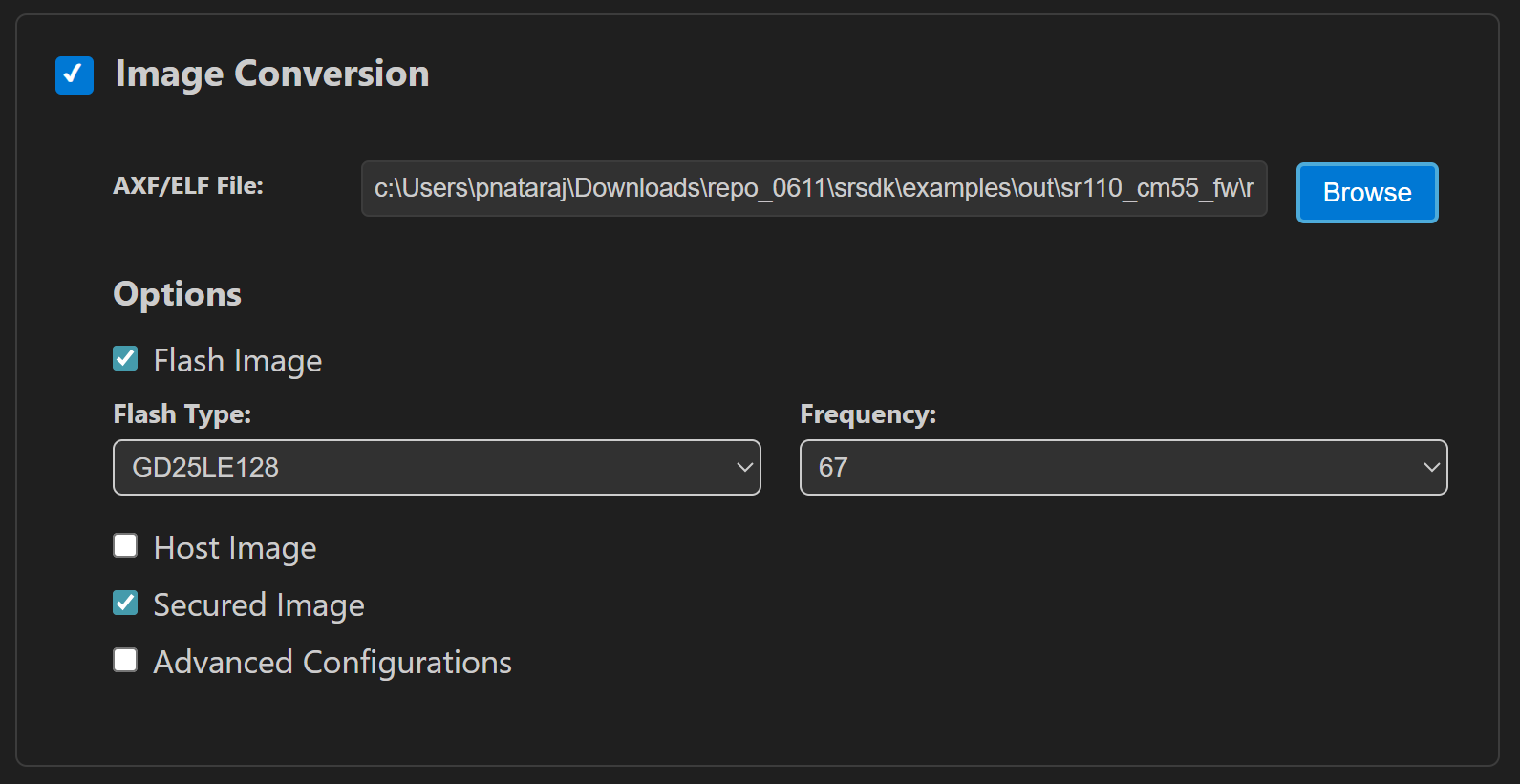
Click Run to create the binary files.
Refer to Astra MCU SDK VSCode Extension User Guide for more detailed instructions.
Model Binary generation (to place the Model in Flash)
To generate
.binfile for TFLite models, please refer to the Vela compilation guide.
Running the Application using VS Code Extension
Connect the board and press RESET.
For logging output, click SERIAL MONITOR and connect to the DAP logger port on J14.
To make it easier to identify, ensure only J14 is plugged in (not J13).
The logger port is not guaranteed to be consistent across OSes. As a starting point:
Windows: try the lower-numbered J14 COM port first.
Linux/macOS: try the higher-numbered J14 port first.
If you do not see logs after a reset, switch to the other J14 port.
The inference logs (including error metrics) appear in the logger window.
Expected Logs
SR100.Logger	warning	1769080093.215686	LOGR	0	M55	00:06:31:469:271	Changing logger interface to LOGGER_IF_UART_1
SR100.Logger	info	1769080093.215686	SYS 	0	M55	00:00:00:000:023	System initialization complete without errors.
SR100.Logger	info	1769080093.215686	SYS 	0	M55	00:00:00:003:583	sr110 SDK version 1.3.0
SR100.Logger	info	1738309188.036045	INFR	0	M55	00:00:00:168:561	Arena size provided : 648000
SR100.Logger	info	1738309188.038579	INFR	0	M55	00:00:00:169:577	Memory used by the model : 645340 bytes
SR100.Logger	info	1738309188.040656	INFR	0	M55	00:00:00:169:594	Run inference 3 times
SR100.Logger	info	1738309188.04209	INFR	0	M55	00:00:00:169:608
SR100.Logger	warning	1738309188.043109	*this message is not in proper format!:Begin inference

SR100.Logger	info	1738309188.044134	INFR	0	M55	00:00:00:221:604	model callback arg : 0
SR100.Logger	info	1738309188.046134	INFR	0	M55	00:00:00:221:618	Invoke finished
SR100.Logger	info	1738309188.047135	INFR	0	M55	00:00:00:222:577
SR100.Logger	warning	1738309188.048672	*this message is not in proper format!:Comparing inference results vs expected results from Python

SR100.Logger	info	1738309188.049669	INFR	0	M55	00:00:00:222:605
SR100.Logger	warning	1738309188.051685	*this message is not in proper format!:This model has 3 output tensors

SR100.Logger	info	1738309188.052809	INFR	0	M55	00:00:00:224:760	Result for output #0
SR100.Logger	info	1738309188.053834	INFR	0	M55	00:00:00:224:774	Max Diff : 0
SR100.Logger	info	1738309188.055833	INFR	0	M55	00:00:00:224:787	MAE      : 0.000000
SR100.Logger	info	1738309188.058806	INFR	0	M55	00:00:00:224:801	MSE      : 0.000000
SR100.Logger	info	1738309188.060841	INFR	0	M55	00:00:00:224:815	RMSE     : 0.000000
SR100.Logger	info	1738309188.062842	INFR	0	M55	00:00:00:224:829	PSNR     : inf
SR100.Logger	info	1738309188.065096	INFR	0	M55	00:00:00:225:127	Result for output #1
SR100.Logger	info	1738309188.066098	INFR	0	M55	00:00:00:225:141	Max Diff : 0
SR100.Logger	info	1738309188.067611	INFR	0	M55	00:00:00:225:154	MAE      : 0.000000
SR100.Logger	info	1738309188.068626	INFR	0	M55	00:00:00:225:168	MSE      : 0.000000
SR100.Logger	info	1738309188.069626	INFR	0	M55	00:00:00:225:182	RMSE     : 0.000000
SR100.Logger	info	1738309188.070954	INFR	0	M55	00:00:00:225:196	PSNR     : inf
SR100.Logger	info	1738309188.071977	INFR	0	M55	00:00:00:226:779	Result for output #2
SR100.Logger	info	1738309188.07298	INFR	0	M55	00:00:00:226:793	Max Diff : 0
SR100.Logger	info	1738309188.074977	INFR	0	M55	00:00:00:226:806	MAE      : 0.000000
SR100.Logger	info	1738309188.076337	INFR	0	M55	00:00:00:226:820	MSE      : 0.000000
SR100.Logger	info	1738309188.078367	INFR	0	M55	00:00:00:226:834	RMSE     : 0.000000
SR100.Logger	info	1738309188.079368	INFR	0	M55	00:00:00:226:848	PSNR     : inf
SR100.Logger	info	1738309188.080385	USB 	0	M55	00:00:00:330:852	USB device mounted
SR100.Logger	info	1738309188.082878	USB 	0	M55	00:00:00:330:870	USB started
SR100.Logger	debug	1738309188.08488	GENR	0	M55	00:00:00:380:171	no handlers have been registered for event USB_CDC_0_EVENTS:3 posted to loop 3000f348
SR100.Logger	info	1738309188.869035	INFR	0	M55	00:00:01:227:180
SR100.Logger	warning	1738309188.871573	*this message is not in proper format!:Begin inference

SR100.Logger	info	1738309188.935641	INFR	0	M55	00:00:01:283:897	model callback arg : 0
SR100.Logger	info	1738309188.939167	INFR	0	M55	00:00:01:283:911	Invoke finished
SR100.Logger	info	1738309188.940691	INFR	0	M55	00:00:01:284:193
SR100.Logger	warning	1738309188.943505	*this message is not in proper format!:Comparing inference results vs expected results from Python

SR100.Logger	info	1738309188.94552	INFR	0	M55	00:00:01:284:221
SR100.Logger	warning	1738309188.946974	*this message is not in proper format!:This model has 3 output tensors

SR100.Logger	info	1738309188.949544	INFR	0	M55	00:00:01:286:376	Result for output #0
SR100.Logger	info	1738309188.953164	INFR	0	M55	00:00:01:286:390	Max Diff : 0
SR100.Logger	info	1738309188.961079	INFR	0	M55	00:00:01:286:403	MAE      : 0.000000
SR100.Logger	info	1738309188.963373	INFR	0	M55	00:00:01:286:417	MSE      : 0.000000
SR100.Logger	info	1738309188.965372	INFR	0	M55	00:00:01:286:431	RMSE     : 0.000000
SR100.Logger	info	1738309188.972908	INFR	0	M55	00:00:01:286:445	PSNR     : inf
SR100.Logger	info	1738309188.975213	INFR	0	M55	00:00:01:286:743	Result for output #1
SR100.Logger	info	1738309188.976213	INFR	0	M55	00:00:01:286:757	Max Diff : 0
SR100.Logger	info	1738309188.97875	INFR	0	M55	00:00:01:286:770	MAE      : 0.000000
SR100.Logger	info	1738309188.980765	INFR	0	M55	00:00:01:286:784	MSE      : 0.000000
SR100.Logger	info	1738309188.983763	INFR	0	M55	00:00:01:286:798	RMSE     : 0.000000
SR100.Logger	info	1738309188.985761	INFR	0	M55	00:00:01:286:812	PSNR     : inf
SR100.Logger	info	1738309188.989857	INFR	0	M55	00:00:01:288:396	Result for output #2
SR100.Logger	info	1738309188.994522	INFR	0	M55	00:00:01:288:410	Max Diff : 0
SR100.Logger	info	1738309188.999043	INFR	0	M55	00:00:01:288:423	MAE      : 0.000000
SR100.Logger	info	1738309189.002044	INFR	0	M55	00:00:01:288:437	MSE      : 0.000000
SR100.Logger	info	1738309189.005753	INFR	0	M55	00:00:01:288:451	RMSE     : 0.000000
SR100.Logger	info	1738309189.009902	INFR	0	M55	00:00:01:288:465	PSNR     : inf
SR100.Logger	info	1738309189.92458	INFR	0	M55	00:00:02:288:446
SR100.Logger	warning	1738309189.928116	*this message is not in proper format!:Begin inference

SR100.Logger	info	1738309189.994035	INFR	0	M55	00:00:02:345:267	model callback arg : 0
SR100.Logger	info	1738309189.995035	INFR	0	M55	00:00:02:345:282	Invoke finished
SR100.Logger	info	1738309189.996034	INFR	0	M55	00:00:02:345:458
SR100.Logger	warning	1738309189.999167	*this message is not in proper format!:Comparing inference results vs expected results from Python

SR100.Logger	info	1738309190.000185	INFR	0	M55	00:00:02:345:487
SR100.Logger	warning	1738309190.002182	*this message is not in proper format!:This model has 3 output tensors

SR100.Logger	info	1738309190.005181	INFR	0	M55	00:00:02:347:641	Result for output #0
SR100.Logger	info	1738309190.010306	INFR	0	M55	00:00:02:347:655	Max Diff : 0
SR100.Logger	info	1738309190.013815	INFR	0	M55	00:00:02:347:668	MAE      : 0.000000
SR100.Logger	info	1738309190.016467	INFR	0	M55	00:00:02:347:682	MSE      : 0.000000
SR100.Logger	info	1738309190.02002	INFR	0	M55	00:00:02:347:696	RMSE     : 0.000000
SR100.Logger	info	1738309190.023006	INFR	0	M55	00:00:02:347:710	PSNR     : inf
SR100.Logger	info	1738309190.026008	INFR	0	M55	00:00:02:348:008	Result for output #1
SR100.Logger	info	1738309190.030148	INFR	0	M55	00:00:02:348:022	Max Diff : 0
SR100.Logger	info	1738309190.033146	INFR	0	M55	00:00:02:348:035	MAE      : 0.000000
SR100.Logger	info	1738309190.036152	INFR	0	M55	00:00:02:348:049	MSE      : 0.000000
SR100.Logger	info	1738309190.038683	INFR	0	M55	00:00:02:348:063	RMSE     : 0.000000
SR100.Logger	info	1738309190.041691	INFR	0	M55	00:00:02:348:077	PSNR     : inf
SR100.Logger	info	1738309190.044682	INFR	0	M55	00:00:02:349:662	Result for output #2
SR100.Logger	info	1738309190.047203	INFR	0	M55	00:00:02:349:676	Max Diff : 0
SR100.Logger	info	1738309190.050237	INFR	0	M55	00:00:02:349:689	MAE      : 0.000000
SR100.Logger	info	1738309190.056236	INFR	0	M55	00:00:02:349:703	MSE      : 0.000000
SR100.Logger	info	1738309190.057752	INFR	0	M55	00:00:02:349:717	RMSE     : 0.000000
SR100.Logger	info	1738309190.058775	INFR	0	M55	00:00:02:349:731	PSNR     : inf
SR100.Logger	info	1738309190.997727	INFR	0	M55	00:00:03:349:712	Inference basic sample application finished