Astra MCU SDK Reference
This document is a comprehensive reference for the Astra MCU SDK. It describes the SDK structure, build and configuration model, project layout, image generation, flashing tools, and common troubleshooting. It is not a quick start guide and focuses on SDK internals and CLI workflows.
Throughout this guide, <sdk-root> refers to the folder where you extracted or cloned the SDK (for example, C:\Users\<YourName>\ASTRA_MCU_SDK_x.x.x\).
Table of Contents
Scope and Audience
Use this reference if you need to:
Understand how the SDK is organized and built.
Configure SDK or application features.
Build SDK packages and applications with the CLI.
Generate images and flash devices.
Troubleshoot build, image generation, or flashing issues.
Before using this reference, complete the setup and installation steps:
CLI setup: Setup and Install SDK using CLI
Supported Platforms and Boards
Boards
Astra Machina Micro SR110 (SR110_RDK)
Astra Machina SL2610 (SL2610_RDK)
Platform Differences (at a glance)
Feature |
SR110 |
SL2610 |
|---|---|---|
MCU core |
Cortex-M55 |
Cortex-M52 |
NPU |
Ethos-U55 |
None |
Flash media |
External XSPI |
eMMC (via USB boot tool) |
Image generation |
SRSDK image generator |
Image generator + USB boot tool |
Debug |
OpenOCD + probe |
Not supported in this SDK flow |
Toolchains |
GCC, AC6, LLVM |
GCC, AC6 |
Platform Guides
SR110 platform and hardware: SR110 Platform Guide
SL2610 platform and hardware: SL2610 Platform Guide
Host Requirements
Supported Host OS
Windows (x64)
Linux (Ubuntu 22.04)
macOS (Apple Silicon & Intel)
Required Tools
Tool |
Version Guidance |
Notes |
|---|---|---|
CMake |
4.1.2 |
Build system generator |
Ninja |
1.13.1 |
Build executor |
Python |
3.13.x |
Required for configuration tools and image generation |
OpenOCD |
Host package or xPack |
Required for SR110 flashing |
Toolchains
GCC 13.2.1 (all platforms)
Arm Compiler 6.19 (AC6)
LLVM Clang 21.x (SR110 only; requires GCC sysroot)
Use only one toolchain per build. Do not mix toolchains across SDK and application builds.
Environment Setup
Use these for host setup and tool installation:
Build environment guides (OS + toolchain specific guides)
SDK Repository Layout
Top-level directories:
arch/CPU architecture supportboard/Board-specific support filesbootloader/Bootloader sourcesconfigs/SDK defconfigs (bootloader, tflite, default package)drivers/Hardware driversexamples/Sample applications and example build systemkconfig/SDK-level configuration entryos/RTOS support (FreeRTOS and related)soc/SoC-specific sourcestools/Build, image, flashing, and utility toolsutilities/Common utilitiesthird_party/External dependencies
Examples Layout (in-tree)
examples/
|-- README.md                    # Examples overview and build guidance
|-- audio_examples/              # Audio examples
|   `-- <example>/               # Example application
|-- driver_examples/             # Driver examples
|   |-- <example>/               # Example application
|   |   |-- configs/             # Application defconfigs
|   |   |-- hw/<BOARD>/          # Board-specific init files
|   |   |-- CMakeLists.txt       # Application CMake entry
|   |   |-- Makefile             # Application build wrapper
|   |   |-- kconfig              # Application config options
|   |   |-- src.cmake            # Application source list
|   |   `-- <sources>            # Application source files
|-- inference_examples/          # Inference examples
|   `-- <example>/               # Example application
|-- sample_demo_app/             # Standalone demo application
|-- system_manager/              # Standalone system manager application
|-- usb_examples/                # USB examples
|   `-- <example>/               # Example application
`-- vision_examples/             # Vision examples
    `-- <example>/               # Example application
Out-of-tree custom applications are supported. Point SRSDK_DIR to the SDK root and keep your application repo separate.
The current in-tree examples are organized by functional category. Within each application, the configs/ directory holds that app’s defconfigs for all supported boards, while the hw/<BOARD>/ directory contains board-specific hardware setup needed by that app, such as pinmux, UART, and logger mux configuration.
Project Structure and Module Organization
The SDK is organized as functional modules. Each module typically contains its own CMakeLists.txt and, when configurable, a Kconfig file. The root CMakeLists.txt includes major subsystems, and each subsystem adds its sources and include paths.
Root-Level Build Entry
CMakeLists.txtin the SDK root drives inclusion of core subsystems (bootloader, firmware, tflite, drivers, OS).tools/cmake/flags.cmakecentralizes compiler flags and warnings.tools/cmake/contains SDK CMake modules and shared example-build helper modules.
Module-Level Structure
Each module uses
target_sources()to add sources andtarget_include_directories()to expose headers.Modules can be conditionally included based on Kconfig selections.
Kconfig Hierarchy
Top-level
kconfigsources module Kconfig files (e.g.,drivers/Kconfig,soc/*/Kconfig).Selecting options in Kconfig controls which modules and features are built.
Where to Look for Specific Pieces
SoC configuration:
soc/Board configuration:
board/Drivers:
drivers/OS abstraction:
os/Bootloader:
bootloader/TFLite Micro:
AI/andthird_party/Tools and scripts:
tools/App/Example inclusion logic: category-level files such as
examples/inference_examples/CMakeLists.txtand per-app files such asexamples/<example_type>/<app>/CMakeLists.txt
Build System Overview
The SDK supports two primary build entry points:
SDK root (
<sdk-root>): build the SDK package, bootloader, or TFLite Micro libraries.Application folder (
<sdk-root>/examples/<example_type>/<app>orexamples/<app>): build an individual application, either app-only or combined SDK + app.
Out-of-tree builds are supported: keep your custom application in a separate folder and set SRSDK_DIR to the SDK root.
The build system is layered:
Make: orchestration and entry points (
Makefilein the SDK root and in each application directory underexamples/).Kconfig: configuration UI and
.configgeneration.CMake: build generation.
Ninja: actual compilation and linking.
Key Build Concepts
Defconfig: Minimal config snapshot. Applied to produce
.config..config: Full configuration file, used to generate
config.hand build flags.config.h: Generated header consumed by C/C++ sources.
SDK package: Installed libraries and headers used by application builds.
SDK package installation: Produces a reusable SDK package (headers, libraries, toolchain CMake files, and
config.h) that application builds link against.
CMake Build Details
This section describes the CMake flow at a practical level.
SDK Root CMake (core SDK builds)
Reads
build/config.hto loadCONFIG_*settings (generated from Kconfig).Uses those settings to select linker scripts and build flags.
Builds the SDK libraries and packages them for reuse.
Exports a CMake package under
install/<BOARD>/<BUILD_TYPE>/lib/cmake/SynapticsSDK/.
Examples CMake (application builds)
Builds app targets named
${CONFIG_PROJECT}_${CONFIG_BUILD_TYPE}(for examplesr110_cm55_fw).BUILD=SRSDKbuilds the SDK package and the app together.BUILD=EXAMPLEuses the app-local SDK install under that application’sinstall/directory. This requires that the application’s SDK package has already been created at least once, typically by an earlier combined SDK+app build.BUILD=EXAMPLE USE_PREINSTALLED_SDK=1uses the SDK package already installed underSRSDK_DIR/install/<BOARD>/<BUILD_TYPE>/, typically created earlier from the SDK root for the selected board and build type.Some applications need SDK dependencies beyond what is included in the default installed SDK package. In that case, the build system automatically falls back to building an app-specific SDK package locally and then builds the application against that package.
Example apps are included when their
kconfigsymbol is enabled.USE_APP_CACHE=ON(default) uses a small per‑app cache of SDK headers/libs for faster rebuilds.
Configuration Model (Kconfig)
Where Configuration Lives
SDK defconfigs:
configs/<BOARD>/*_defconfigApplication defconfigs:
examples/**/configs/*_defconfig
Configuration Flow
Apply a defconfig to generate
.config.(Optional) Modify using
menuconfig.Build generates
config.hand uses it for compilation.
The Makefiles use Python helpers under tools/scripts/kconfig/:
defconfig.pyapplies defconfigs.menuconfig.pylaunches the interactive menu.genconfig.pygeneratesconfig.h.savedefconfig.pywrites a minimal defconfig.
Key Defconfig Fields
Common fields you will see in defconfigs:
CONFIG_PROJECT: Project family (e.g.,sr110,sl2610).CONFIG_BUILD_TYPE: Target type (e.g.,cm55_fw,cm52_fw,bootloader,tflite_micro).CONFIG_COMPILER: Compiler selection (gcc,ac6,llvm).CONFIG_TOOLCHAIN: Toolchain selection (GCC.13.2.1,AC6.6.18.0,LLVM)CONFIG_BOARD: Board name (e.g.,sr110_rdk,sl2610_rdk).CONFIG_BOARD_REV: Board revision (when applicable).CONFIG_CPU_LIST: CPUs included in a multi-CPU board build (for exampleCM55 CM4).CONFIG_BUILD_LIST: Multi-CPU build entries processed bymake astrasdk(for examplecm55_fw cm55_bootloader_fw cm4_fw).
These values drive the build directory structure and output names.
CONFIG_COMPILER must match the active toolchain environment variables; use the same compiler for SDK and app builds.
If CONFIG_BUILD_LIST is defined in the active SDK defconfig, the SDK root build runs in multi-CPU mode and builds each listed firmware entry in sequence.
Build Modes
CONFIG_BUILD_MODE controls optimization and output directories:
release: optimized output, minimal logging.debug: debug symbols and extra logging.
Build modes map to output folders: release/ or debug/.
Note: Build types used in defconfigs are cm55_fw, cm52_fw, bootloader, and tflite_micro.
Build Workflows
SDK Root Builds (from <sdk-root>)
Use SDK root for bootloader, TFLite Micro, or SDK package builds.
Apply a defconfig:
make default_config BOARD=<BOARD>
Build the currently selected SDK target:
make astrasdk
For bootloader or TFLite Micro builds, apply the corresponding defconfig and then run:
make <bootloader_defconfig> BOARD=<BOARD>
make astrasdk

make <tflite_defconfig> BOARD=<BOARD>
make astrasdk
Multi-CPU SDK Workflow
Use this SDK-root flow when one board build must produce firmware for more than one CPU. The main difference from a single-CPU SDK build is that you apply a board-level main defconfig that defines the CPU list and the firmware entries to build.
For the current SR110 multi-CPU flow:
cd <sdk-root>
make sr110_rdk_main_defconfig BOARD=SR110_RDK
make astrasdk
The main defconfig lives under configs/<BOARD>/ and defines the overall build plan. Example:
CONFIG_PROJECT="sr110"
CONFIG_BOARD="sr110_rdk"
CONFIG_CPU_LIST="CM55 CM4"
CONFIG_BUILD_LIST="cm55_fw cm55_bootloader_fw cm55_tflite_micro_fw cm4_fw"
CONFIG_BUILD_MODE="release"
How the workflow runs:
make sr110_rdk_main_defconfig BOARD=SR110_RDKselects the board-level multi-CPU build definition.make astrasdkreadsCONFIG_BUILD_LISTand treats each entry as a separate SDK build target.For each entry, the build system merges the main defconfig with the matching CPU-specific defconfig from
configs/<BOARD>/, generatesbuild/config.h, and runs CMake + Ninja for that target.Installable entries produce reusable SDK package outputs that later application builds can link against.
Common CONFIG_BUILD_LIST entry patterns:
Entry Pattern |
Meaning |
Installed by |
|---|---|---|
|
Standard firmware |
Yes |
|
TrustZone secure firmware |
Yes |
|
TrustZone non-secure firmware |
Yes |
|
Bootloader packaged in SDK-install flow |
Yes |
|
Downloader packaged in SDK-install flow |
Yes |
|
Bootloader-only build output |
No |
|
Downloader-only build output |
No |
|
TFLite Micro build flow |
No |
Defconfig naming follows the entry type. Examples:
cm55_fwexpectssr110_cm55_fw_defconfigcm55_bootloader_fwexpectssr110_cm55_bootloader_fw_defconfigcm55_tflite_micro_fwexpectssr110_cm55_tflite_micro_defconfigcm4_fwexpectssr110_cm4_fw_defconfig
This layout also supports master-slave CPU designs. In those cases, keep shared resource ownership such as clock and pinmux on the master CPU and use the slave CPU defconfig to enable only the modules and drivers that CPU actually needs.
After the SDK multi-CPU build completes, application builds remain per application and per target CPU. Build each application from its own directory using the app defconfig for the CPU you want, and reuse the installed SDK package with BUILD=EXAMPLE or USE_PREINSTALLED_SDK=1 as needed.
Application Builds (from an application directory under examples/)
Use an individual application directory such as <sdk-root>/examples/<example_type>/<app> or <sdk-root>/examples/<app> to build that application.
The configs/ directory contains the defconfigs supported by that application.
Path tips: Use absolute paths for SRSDK_DIR and toolchain variables. On Windows, use escaped backslashes or forward slashes.
Combined SDK + App build
export SRSDK_DIR=<sdk-root>
make <app_defconfig> BUILD=SRSDK
App-only build (uses installed SDK package)
export SRSDK_DIR=<sdk-root>
make build
BUILD Mode (Application only)
BUILD=EXAMPLE(default): build the app only using the app-local SDK package under that application’sinstall/directory. This package must already exist from an earlier SDK+app build.BUILD=SRSDK: build SDK package and the app in one flow (requiresSRSDK_DIR).BUILD=NONE: apply defconfig only (no build).
When to use:
Use BUILD=SRSDK for the first build, after SDK source changes, or when switching toolchains.
Use BUILD=EXAMPLE for faster iteration when only app code changes and the application’s local SDK package already exists.
Custom Tools Override for Application Builds
By default, application builds use the SDK’s shared tools from:
<sdk-root>/tools/
The application build wrapper resolves this as:
TOOLS_DIR=$(SRSDK_DIR)/toolswhenUSE_CUSTOM_TOOLS=0(default)TOOLS_DIR=<app-dir>/toolswhenUSE_CUSTOM_TOOLS=1
Use this when an application repository needs to carry its own copy of the application build helpers instead of using the SDK copy.
Example:
cd <sdk-root>/examples/<example_type>/<app>
export SRSDK_DIR=<sdk-root>
make <app_defconfig> BUILD=SRSDK USE_CUSTOM_TOOLS=1
The same override can also be used with other app-side flows such as:
make <app_defconfig> BUILD=NONE USE_CUSTOM_TOOLS=1
make build USE_CUSTOM_TOOLS=1
make imagegen USE_CUSTOM_TOOLS=1
What USE_CUSTOM_TOOLS=1 changes
The application wrapper and app CMake look for these helper paths under <app-dir>/tools/ instead of <sdk-root>/tools/:
cmake/ParseConfigHeader.cmakecmake/example_config_setup.cmakecmake/case_handler.cmakecmake/example_target_detector.cmakecmake/toolchain.cmakecmake/example_flags.cmakecmake/get_git_info.cmakecmake/example_build_config.cmakecmake/toolchain_setup.cmakecmake/example_linker_setup.cmakescripts/kconfig/defconfig.pyscripts/kconfig/menuconfig.pyscripts/kconfig/genconfig.pyscripts/kconfig/savedefconfig.pyscripts/sdk_rebuild.pyimage_gen/image_generator.pyscripts/image/build_preboot_mcu.pyscripts/image/build_preboot_mcu_wsl.py
If you keep custom tools inside the application repository, preserve the same directory layout and filenames so the existing application Makefile and CMakeLists.txt continue to work unchanged.
Note:
SRSDK_DIRis still required even whenUSE_CUSTOM_TOOLS=1.The application wrapper itself is still included from
$(SRSDK_DIR)/tools/make/example_app.mk.During
BUILD=SRSDK, the compiler toolchain file${CONFIG_TOOLCHAIN}.cmakeis still included from$(SRSDK_DIR)/tools/cmake/.During
BUILD=EXAMPLE, the toolchain file is loaded from the selected installed SDK package underinstall/<BOARD>/<BUILD_TYPE>/tools/cmake/.
Build Multiple Applications with One SDK Package
If you want to build several applications against the same SDK package, first build and install the SDK from the SDK root, then build each application with BUILD=EXAMPLE USE_PREINSTALLED_SDK=1.
cd <sdk-root>
export SRSDK_DIR=<sdk-root>
make default_config BOARD=<BOARD>
make astrasdk

cd <sdk-root>/examples/<example_type>/<app1>
make <app1>_defconfig BUILD=EXAMPLE USE_PREINSTALLED_SDK=1

cd <sdk-root>/examples/<example_type>/<app2>
make <app2>_defconfig BUILD=EXAMPLE USE_PREINSTALLED_SDK=1
This reuses the SDK package from SRSDK_DIR/install/<BOARD>/<BUILD_TYPE>/. If that package does not include the SDK pieces required by a specific application, the build system automatically creates an app-local SDK package for that application and continues the build.
Create a Custom Defconfig (Application)
Start from an existing defconfig:
make <app>_defconfig BUILD=NONE
Open the configuration UI:
make menuconfig
Save your new defconfig under
configs/(for examplemy_custom_app_defconfig).make savedefconfig OUT=my_custom_app
This writes
configs/my_custom_app_defconfigin the current application directory.
The new defconfig can then be used like any other:
make my_custom_app_defconfig BUILD=SRSDK
Build Outputs and Artifacts
SDK Root Outputs
build/contains build artifacts andconfig.h(CMake build tree isbuild/<project>/<compiler>/).out/<target>/<mode>/contains SDK root binaries:GCC/LLVM:
<target>.elfand<target>.binAC6:
<target>.axfand<target>.bin
prebuilt/<PROJECT>/tflite_micro/<mode>/contains TFLM libs when buildingtflite_micro.
For multi-CPU SDK builds, you get one output target per CONFIG_BUILD_LIST entry, for example out/sr110_cm55_fw/release/ and out/sr110_cm4_fw/release/.
Application Outputs
<app-dir>/out/<target>/<mode>/contains application binaries.GCC/LLVM:
<target>.elfand<target>.binAC6:
<target>.axfand<target>.bin
<app-dir>/build/<project>/<compiler>/contains the application CMake build tree.<app-dir>/build/<project>/<compiler>/srsdk_build/.cache/is the app-local SDK cache (auto-managed; refreshed when SDK content changes). Disable withUSE_APP_CACHE=OFFif needed.<app-dir>/install/<BOARD>/<BUILD_TYPE>/contains the app-local installed SDK package:include/SDK headerslib/SDK librariesconfig.htools/cmake/SDK CMake toolchain modules used by the app build
The installed package also provides CMake package files under:
App-local install, generated during
BUILD=SRSDKfor an application:
<app-dir>/install/<BOARD>/<BUILD_TYPE>/lib/cmake/SynapticsSDK/
SDK-root install, generated from
<sdk-root>aftermake default_config BOARD=<BOARD>andmake astrasdk:
<sdk-root>/install/<BOARD>/<BUILD_TYPE>/lib/cmake/SynapticsSDK/
Generated Config Headers
build/config.hin SDK root: generated from SDK.config.build/config.hin an application directory: generated from that application’s.configand used for the application build.
Target naming:
<target>is${CONFIG_PROJECT}_${CONFIG_BUILD_TYPE}(for examplesr110_cm55_fworsl2610_cm52_fw).<mode>isreleaseordebug, based onCONFIG_BUILD_MODE.
Image Generation
SR110 Image Generation (SRSDK Image Generator)
Tool: tools/srsdk_image_generator/srsdk_image_generator.py
Required: Python 3.13 venv active and tools/srsdk_image_generator/requirements.txt installed.
Typical command (from <sdk-root>/tools/srsdk_image_generator):
cd <sdk-root>/tools/srsdk_image_generator
python srsdk_image_generator.py \
  -B0 \
  -flash_image \
  -sdk_secured \
  -spk "<sdk-root>/tools/srsdk_image_generator/Inputs/spk_rc4_1_0_secure_otpk.bin" \
  -apbl "<sdk-root>/tools/srsdk_image_generator/Inputs/sr100_b0_bootloader_ver_0x012F_ASIC.axf" \
  -m55_image "<sdk-root>/examples/<example_type>/<app>/out/sr110_cm55_fw/release/sr110_cm55_fw.elf" \
  -flash_type "GD25LE128" \
  -flash_freq "67"
Output (example):
<sdk-root>/tools/srsdk_image_generator/Output/B0_Flash/B0_flash_full_image_GD25LE128_67Mhz_secured.bin
Key flags:
-flash_imageor-host_image: choose flash or host image output.-sdk_secured/-sdk_non_secured: SDK security mode.-model_secured/-model_non_secured: model security mode.-spk,-apbl,-m55_image: required inputs for SR110.-flash_type,-flash_freq: flash configuration (types:GD25LE128,W25Q128,MX25U128; frequencies:34,67,100,134MHz).-m4_image,-npu_c_image,-model: additional payloads for multi-core or model flows.-single_slot: generate a single-slot image layout.-json_attr/-parse_attr: use JSON-based flash attributes.-Q4: flash 4-bit support (1/0).
SL2610 Image Generation (Image Generator)
Tool: tools/image_gen/image_generator.py
Required: Python 3.13 venv active.
Note: SL2610 image generation is not supported on native Windows.
Windows users should use WSL for image generation.
In the WSL environment, install required tools such as Python, make, and the Arm GNU toolchain.
You can use the VS Code extension’s Tools Installer from WSL, or follow
Linux Environment guide for CLI setup.
Recommended entry:
cd <sdk-root>/examples/<app-dir>
make imagegen
This runs a two-step pipeline:
tools/image_gen/image_generator.pyto generate raw images usingtools/image_gen/inp.json.tools/scripts/image/build_preboot_mcu.pyto package sub-images for USB boot and eMMC workflows.
Final outputs:
<app-dir>/out/image/eMMCimg/sysmgr.subimg.gz<app-dir>/out/image/eMMCimg/<app-dir>/out/image/usb_boot/
Intermediate outputs from image generation:
<app-dir>/out/nexus_bin/<app-dir>/out/nexus_loadable/
If you need to change inputs, update tools/image_gen/inp.json. Paths in this file are relative to the application’s out/ directory.
The preboot packaging step uses signing keys under tools/signingKeys/<soc>/ and SPK assets for USB boot images.
If you see permission errors on Linux/macOS:
cd <sdk-root>
chmod +x tools/scripts/image/bin/gen*
Flashing
SR110 (OpenOCD Flash Script)
Tool: tools/openocd/scripts/flash_xspi_tcl.py
OpenOCD config files live under tools/openocd/configs/. For SR110, sr110_m55.cfg is the standard config.
Example (from <sdk-root>):
cd <sdk-root>
python tools/openocd/scripts/flash_xspi_tcl.py \
  --cfg_path tools/openocd/configs/sr110_m55.cfg \
  --image tools/srsdk_image_generator/Output/B0_Flash/B0_flash_full_image_GD25LE128_67Mhz_secured.bin \
  --erase-all
Key options:
--cfg_path(required): OpenOCD config file--image: Binary image to program--erase-all: Full chip erase--verify-only: Verify contents without programming--probe: Select probe (defaultcmsis-dap, usejlinkfor J-Link)--openocd: Path to OpenOCD binary--flash-offset: Flash offset for programming--file-offset: Offset into image file--erase-only: Erase only, no programming--log-level: DEBUG/INFO/WARN/ERROR--tcl_port,--tcl_host: OpenOCD TCL interface settingsUse
--probe jlink(or--probe cmsis-dap) to select the adapter driver.
SL2610 (USB Boot Tool)
Tool: tools/usb_boot_python_tool/USB_BOOT_TOOL/usb_boot_tool.py
Required: Python 3.13 venv active and pyserial installed.
Enter USB boot mode first:
Press and hold USB_BOOT, then press RESET.
Release RESET, then release USB_BOOT.
Run System Manager (from <sdk-root>/tools/usb_boot_python_tool/USB_BOOT_TOOL):
cd <sdk-root>/tools/usb_boot_python_tool/USB_BOOT_TOOL
python usb_boot_tool.py --op run-sm \
  --sm <sdk-root>/examples/<example_type>/<app>/out/image/eMMCimg/sysmgr.subimg.gz \
  --spk <sdk-root>/examples/<example_type>/<app>/out/image/usb_boot/spk.bin \
  --keys <sdk-root>/examples/<example_type>/<app>/out/image/usb_boot/key.bin \
  --m52bl <sdk-root>/examples/<example_type>/<app>/out/image/usb_boot/m52bl.bin
Full eMMC flashing:
python usb_boot_tool.py --op emmc --img-dir <path-to-eMMCimg>
Notes:
--op emmcrequires a Yocto-generatedeMMCimgfolder withemmc_part_listandemmc_image_list.If
run-smfails because SM CDC is already running, power-cycle the board and retry.
Where to Run Commands
Use the table below to choose the correct working directory.
Command or Task |
Run From |
Notes |
|---|---|---|
|
|
Applies SDK default defconfig |
|
|
Apply SDK bootloader defconfig, then run |
|
|
Apply SDK TFLite Micro defconfig, then run |
|
|
Builds the currently selected SDK target |
|
|
Combined SDK + app build |
|
|
App-only build (requires |
|
|
Application image generation pipeline |
|
|
SR110 image generation |
|
|
SR110 flashing (OpenOCD) |
|
|
SL2610 USB boot flashing |
Debugging
SL2610 - Manual Debug Steps (using OpenOCD and GDB)
This section outlines a manual, step-by-step workflow to load the bootloader and connect a debugger for the SL2610 device.
For debugging steps using the VS Code extension, see Astra MCU SDK VSCode Extension User Guide.
Prerequisites
OpenOCD installed and available in
PATHARM GNU toolchain installed and available in
PATHSL2610 board with a J-Link connection
J-Link Connection
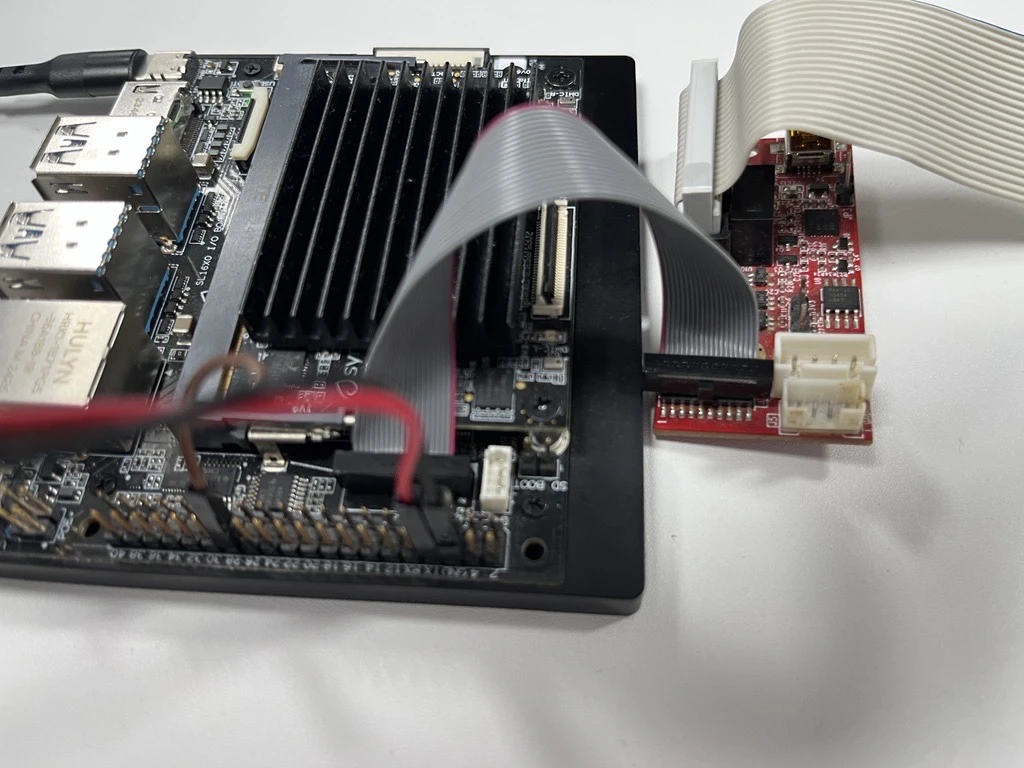
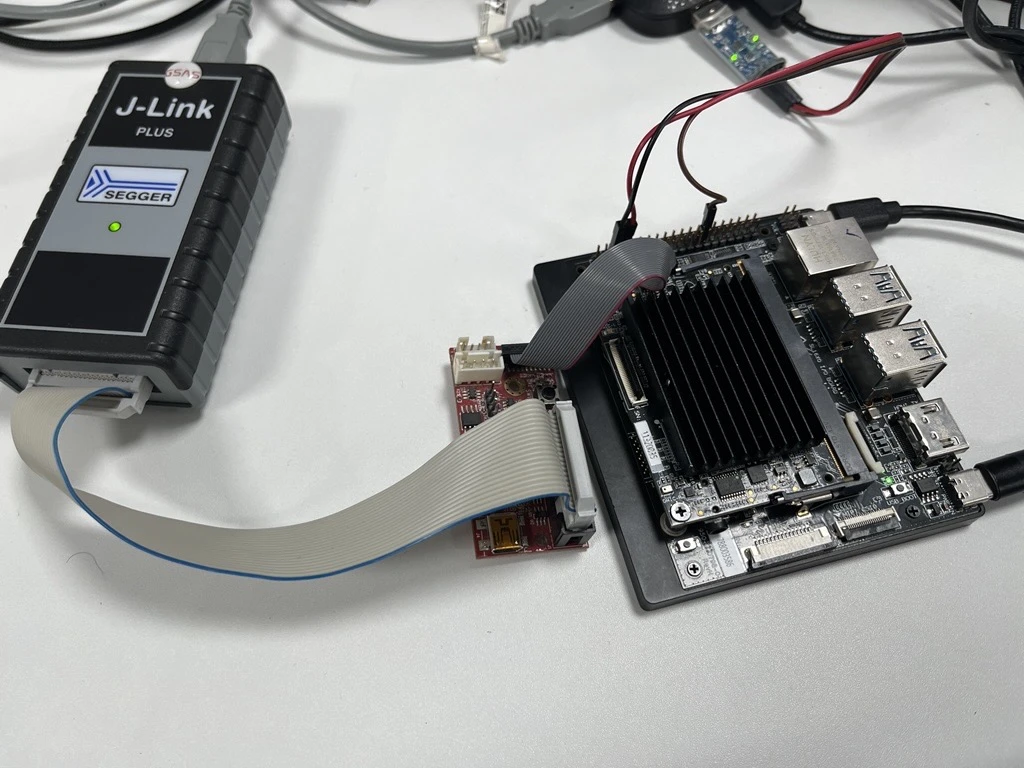
1) Build the Bootloader
From the <sdk-root> folder, build the bootloader as outlined in Build Workflows. After a successful build, you should see:
Output file:
sl2610_bootloader.elfLocation:
out/sl2610_bootloader/release
2) Build a Sample App + Generate Image
Build any sample app in release mode, then run make imagegen. Detailed steps for image generation is outlined in SL2610 Image Generation (Image Generator)
On completion, you should get:
m52bl.binatout/image/usb_boot/m52bl.bin
Copy the full path to m52bl.bin for the next step.
3) Run USB Boot Tool
Change directory to the USB boot tool folder:
cd .\tools\usb_boot_python_tool\USB_BOOT_TOOL\
Make sure:
The device is connected
The device is in USB boot mode (long press USB boot button, press reset, then release)
4) Load SPK + Bootloader
Run the USB boot tool command:
python usb_boot_tool.py --op run-spk --spk spk.bin --m52bl <paste the m52bl.bin path>
Expected output example:
Auto-detecting VID:0x06CB, PID:0x019E serial port...
Syna USB CDC port detected: COM88
 ✔  key.bin UPLOADED (0.18s @ 0.15MB/s)
 ✔  spk.bin UPLOADED (0.18s @ 0.12MB/s)
 ✔  m52bl.bin UPLOADED (0.11s @ 0.78MB/s)
5) Start OpenOCD
Open another terminal and run:
openocd -f tools/openocd/configs/Klamath_Jlink.cfg
Expected output example:
xPack Open On-Chip Debugger 0.12.0+dev-01685-gb9224c0c0-dirty (2024-08-02-19:51)
Licensed under GNU GPL v2
For bug reports, read
        http://openocd.org/doc/doxygen/bugs.html
Info : Listening on port 6666 for tcl connections
Info : Listening on port 4444 for telnet connections
Warn : Failed to retrieve serial number: LIBUSB_ERROR_TIMEOUT
Info : J-Link V12 compiled Feb 20 2025 16:24:27
Info : Hardware version: 12.00
Info : VTarget = 1.799 V
Info : clock speed 1000 kHz
Info : JTAG tap: nexus.m52 tap/device found: 0x4ba06477 (mfg: 0x23b (ARM Ltd), part: 0xba06, ver: 0x4)
Info : JTAG tap: soc.ca55 tap/device found: 0x4ba06477 (mfg: 0x23b (ARM Ltd), part: 0xba06, ver: 0x4)
Info : [m52] Cortex-M52 r0p2 processor detected
Info : [m52] target has 8 breakpoints, 8 watchpoints
Info : [m52] Examination succeed
Info : [m52] starting gdb server on 3333
Info : Listening on port 3333 for gdb connections
6) Connect with GDB
Once you see the “Listening on port 3333” log, open another terminal and run:
arm-none-eabi-gdb
Then run the following command inside GDB:
target extended-remote: 3333
file <path_to_debug_elf_file>
monitor reset init
monitor halt
load
set breakpoint auto-hw on
monitor arm semihosting enable
hbreak main
continue
step
Note: Keep the OpenOCD terminal running while you use GDB. If GDB fails to connect, confirm OpenOCD is still listening on port 3333.
Applications (Modify or Create)
Modify an existing app
Update sources under
examples/<example_type>/<app>/orexamples/<app>/.If you change configuration options, re-run the app defconfig and rebuild:
cd <sdk-root>/examples/<example_type>/<app>
export SRSDK_DIR=<sdk-root>
make <app>_defconfig
Create a new app (minimal checklist)
Create
examples/<example_type>/<app>/orexamples/<app>/for the new application.Add your application sources and headers.
Add
kconfigwith aconfigsymbol for the application.Add
configs/<app>_defconfigentries for the supported board and build combinations.Add
hw/<BOARD>/hw_init.candhw_init.hif the application needs board-specific hardware setup such as pinmux, UART, logger muxing, or peripheral initialization.Add
CMakeLists.txt,Makefile, andsrc.cmakefollowing an existing application as a reference.Build from the application directory:
cd <sdk-root>/examples/<example_type>/<app>
export SRSDK_DIR=<sdk-root>
make <app>_defconfig BUILD=SRSDK
make <app>_defconfig
Minimal kconfig:
config <APP_SYMBOL>
    bool "Enable <app>"
    default y
Minimal CMakeLists.txt (pattern used by current applications):
cmake_minimum_required(VERSION 3.22)

if(DEFINED ENV{SRSDK_DIR})
    file(TO_CMAKE_PATH "$ENV{SRSDK_DIR}" SRSDK_DIR)
else()
    message(FATAL_ERROR "SRSDK_DIR is not set")
endif()

include(${TOOLS_DIR}/cmake/ParseConfigHeader.cmake)
include(${TOOLS_DIR}/cmake/example_config_setup.cmake)
setup_configs()

include(${TOOLS_DIR}/cmake/case_handler.cmake)
include(${TOOLS_DIR}/cmake/example_target_detector.cmake)
detect_target_config()

set(TARGET ${CONFIG_PROJECT}_${CONFIG_BUILD_TYPE})
string(TOUPPER ${CONFIG_BOARD} CONFIG_BOARD_UPPER)

include(${TOOLS_DIR}/cmake/toolchain.cmake)
include(${TOOLS_DIR}/cmake/example_flags.cmake)
include(${TOOLS_DIR}/cmake/example_build_config.cmake)
include(${TOOLS_DIR}/cmake/toolchain_setup.cmake)
setup_toolchain(${CONFIG_COMPILER})

if(${BUILD} STREQUAL "SRSDK")
    project(srsdk_lib LANGUAGES ASM C CXX)
    add_subdirectory("${SRSDK_DIR}" "${CMAKE_BINARY_DIR}/srsdk_build")
else()
    project(${TARGET} LANGUAGES ASM C CXX)

    find_package(SynapticsSDK 1.0 REQUIRED CONFIG
        PATHS "${INSTALL_ROOT}"
        NO_DEFAULT_PATH
    )

    include(${TOOLS_DIR}/cmake/example_linker_setup.cmake)
    setup_example_linker_scripts(${CONFIG_PROJECT} ${CONFIG_SYNA_CORE})

    add_executable(${TARGET})
    include(${CMAKE_SOURCE_DIR}/src.cmake)
endif()
Minimal src.cmake:
if(${BUILD} STREQUAL "EXAMPLE")
    target_sources(${TARGET} PRIVATE
        ${CMAKE_CURRENT_LIST_DIR}/<app>.c
        ${CMAKE_CURRENT_LIST_DIR}/main.c
        # Add hw_init.c when the app needs board-specific hardware setup
        ${CMAKE_CURRENT_LIST_DIR}/hw/${CONFIG_BOARD_UPPER}/hw_init.c
    )

    target_include_directories(${TARGET} PUBLIC
        ${CMAKE_CURRENT_LIST_DIR}
        # Add the board-specific include path when hw_init.h is used
        ${CMAKE_CURRENT_LIST_DIR}/hw/${CONFIG_BOARD_UPPER}
    )
else()
    target_include_directories(sdk_includes INTERFACE
        $<BUILD_INTERFACE:${CMAKE_CURRENT_LIST_DIR}/hw/${CONFIG_BOARD_UPPER}>
    )
endif()
Notes:
Follow the defconfig naming pattern used by existing applications for each supported board and core.
Add
hw/<BOARD>/for board-specific hardware setup such as pinmux, UART, or logger mux configuration.
Common mistakes:
Defconfig not found: confirm the file exists under the application’s
configs/directory and thatBOARDmatches the selected defconfig.App not built: ensure
CONFIG_<APP_SYMBOL>=yis set in the app defconfig.App directory incomplete: ensure the app folder has
kconfig,CMakeLists.txt,Makefile, andsrc.cmake.Missing sources: ensure
src.cmakeandCMakeLists.txtinclude all required source files.Wrong output target: check
CONFIG_PROJECTandCONFIG_BUILD_TYPE.
Command Reference
SDK Root (<sdk-root>)
Command |
Purpose |
Result |
|---|---|---|
|
Show available targets |
Prints target list |
|
List SDK defconfigs |
Console list |
|
Apply default SDK defconfig |
|
|
Apply specific SDK defconfig |
|
|
Edit SDK config |
|
|
Generate |
|
|
Build the currently selected SDK target |
Use after |
|
Save minimal SDK defconfig |
|
|
Remove build artifacts |
|
|
Run cppcheck |
Console output |
Application Directory (<sdk-root>/examples/<example_type>/<app> or <sdk-root>/examples/<app>)
Command |
Purpose |
Result |
|---|---|---|
|
Show available targets |
Prints target list |
|
List application defconfigs |
Console list |
|
Apply the first defconfig in |
|
|
Apply an application defconfig only |
|
|
Build app-local SDK package and the application |
SDK installed under the app and app built |
|
Apply defconfig and build the application with |
App built using the selected SDK package flow |
|
Build the application using the current |
App binary updated in |
|
Edit application configuration |
|
|
Generate application |
|
|
Generate application images |
Image outputs created under the application directory |
|
Save minimal defconfig |
|
|
Remove application build outputs |
|
|
Remove the app-local installed SDK package |
|
|
Alias for |
App-local SDK package removed |
Notes:
Application-side commands are run from the individual application directory, not from the
examples/root.The selected defconfig provides
CONFIG_BOARD, soBOARD=is not normally needed for application-side builds.build_sdk,build_advanced, andbuild_allare internal helper targets typically invoked through the defconfig flow.BUILD=NONEcan be used to apply a defconfig without building.USE_CUSTOM_TOOLS=1switches application helper lookup fromSRSDK_DIR/tools/to<app-dir>/tools/.
Python Tools
Tool |
Location |
Purpose |
|---|---|---|
|
|
SR110 image generation |
|
|
SL2610 image generation |
|
|
SL2610 sub-image packaging |
|
|
SR110 flashing (OpenOCD) |
|
|
SL2610 USB boot flashing |
|
|
Defconfig/menuconfig/genconfig helpers |
Tools Overview (Non-VS Code)
tools/openocd/: OpenOCD configs and flashing scripts for SR110.tools/usb_boot_python_tool/: USB boot flashing tool for SL2610.tools/image_gen/: SL2610 image generator andinp.jsonconfiguration.tools/srsdk_image_generator/: SR110 image generator and input examples.tools/Inference/: Model conversion and inference helpers (see its README).tools/JLink_Scripts/: J-Link scripts for debugging/programming.tools/Debug_IC_FW/: Debug firmware support assets.tools/signingKeys/: Signing keys used by SL2610 preboot packaging.tools/SPK/: SPK assets used by secure image flows.
Note: Some tools have their own dependency requirements (for example tools/Inference/). Follow the tool-specific README when using them.
Troubleshooting
Build and Configuration Issues
SRSDK_DIRnot set (application build fails)Fix:
export SRSDK_DIR=<sdk-root>before running application-side builds such asBUILD=SRSDK,BUILD=EXAMPLE, ormenuconfig.
Build and Deploy button disabled in VS Code
Cause: An application/example directory is not imported or
SRSDK_DIRis not set.Fix: import the application/example, set
SRSDK_DIRvia Import SDK, then refresh the workspace (close and reopen VS Code).
App-only build fails because SDK package is missing
Fix: for app-local builds, run the application’s combined build once with
make <app>_defconfig BUILD=SRSDK. If you want to use a preinstalled SDK package, build it first from<sdk-root>usingmake default_config BOARD=<BOARD>followed bymake astrasdk.
Toolchain not found
Fix: ensure the correct toolchain env variable is set and the toolchain is on PATH.
Example:
GCC_TOOLCHAIN_13_2_1=/opt/gcc-arm-none-eabi/bin.
LLVM build fails due to missing sysroot
Fix: set
GCC_TOOLCHAIN_ROOTto the GCC toolchain root.
menuconfigfails on LinuxFix: install
libncurses5-devand related packages per the Linux build_env guide.
defconfignot foundFix: verify the defconfig file exists under the current application’s
configs/directory and that you are running the command from the correct application directory.
Custom tools override fails because helper scripts or CMake modules are missing
Fix: when using
USE_CUSTOM_TOOLS=1, make sure the application repository contains the expectedtools/layout and filenames undertools/cmake/,tools/scripts/kconfig/,tools/scripts/, andtools/image_gen/.
Multi-CPU SDK build stops because one entry is missing a defconfig
Fix: check the active main defconfig under
configs/<BOARD>/and confirm everyCONFIG_BUILD_LISTentry has a matching CPU-specific defconfig in the same board config directory.
config.hmissing or staleFix: run
make genconfigfrom the SDK root or from the application directory, depending on what you are building, or rerun the build to regeneratebuild/config.h.
TFLite Micro library not found
Fix: ensure
prebuilt/<PROJECT>/tflite_micro/<mode>/contains the library, or apply the appropriate TFLite Micro defconfig and rebuild from<sdk-root>usingmake astrasdk.If NPU is enabled, TFLM library is required.
Python / Image Generation Issues
Python version mismatch
Fix: activate the SDK virtual environment and verify
python --versionis 3.13.x.
Missing Python packages
Fix:
pip install -r tools/srsdk_image_generator/requirements.txt.
Imagegen permission errors (Linux/macOS)
Fix:
chmod +x tools/scripts/image/bin/gen*.
Flashing Issues
OpenOCD not found
Fix: install OpenOCD and ensure it is in PATH.
OpenOCD cannot connect to target
Fix: check cable, power, and probe selection (
--probe cmsis-dapor--probe jlink).
WSL USB device not visible
Fix: follow the Astra MCU SDK - WSL User Guide for USB pass-through.
SL2610 USB boot fails
Fix: re-enter USB boot mode (USB_BOOT + RESET), then retry.
Build Output Issues
App builds but image generation fails
Fix: confirm output
.elfexists under the application’sout/directory and update image generator input paths.
App/Example build does not pick up new SDK headers/libs
Fix: clean the app cache (
rm -rf <app-dir>/build/<target>/<compiler>/srsdk_build/.cache) or disable it by configuring withUSE_APP_CACHE=OFF.
Link errors from mixed toolchains
Fix: ensure SDK and app are both built with the same compiler (GCC, AC6, or LLVM).