WiFi Driver Sample Application
Description
The WiFi Driver sample application demonstrates WiFi communication and network operations on the supported boards for this application. It performs comprehensive WiFi testing including SDIO-based WiFi bring-up, shell task creation, and network connectivity validation to ensure reliable wireless communication.
The sample includes multiple WiFi operations:
SDIO initialization: Initialize SDIO1 interface for WiFi module communication.
WiFi module bring-up: Initialize and configure WLAN chip modules (4612 or 43711) using prebuilt WiFi libraries.
Shell task creation: Create WiFi shell tasks for test and control flows.
Network connectivity: Establish WiFi connections and validate network operations.
Diagnostic logging: Provide comprehensive status and diagnostic information through logger output.
During each run, the app logs initialization status, WiFi module configuration, network connection progress, and diagnostic results. This makes it easy for end users to confirm that WiFi setup and network operations are working as expected.
The latest example structure uses a common application source tree with board-specific hardware setup kept under hw/<BOARD>/. For this app:
Common application sources such as
main.c,wifi_sample_app.c, andwifi_sample_app.hstay in the app root.Application defconfigs are stored under
configs/.Board and hardware-specific setup is selected from
hw/<BOARD>/, for examplehw/SR110_RDK/.
The application can also be exported and built as a standalone app repository. In that flow, keep this app in its own directory, point SRSDK_DIR to the SDK root, and build from the app directory itself. For the full application workflow model, see Astra MCU SDK User Guide.
Supported Boards
This application supports:
SR110_RDK
Select the defconfig that matches your target board, and the build system will pick the corresponding board-specific hardware setup from hw/<BOARD>/.
Hardware Requirements
Astra Machina Micro Kit (SR110)
WLAN chip module 4612 or 43711 attached to the board (required)
UART bridge adapter for UART1 logging (required)
Prerequisites
Choose one setup path:
Test Case Selection
Before building, choose the testcase defconfig that matches your target board.
You can:
Select the required defconfig directly from the application’s
configs/directory.Run
make list_defconfigsfrom the application directory to list all supported defconfigs.
Available defconfigs:
sr110_rdk_cm55_wifi_sample_app_43711_defconfigsr110_rdk_cm55_wifi_sample_app_4612_defconfig
For this app, the default defconfig is:
sr110_rdk_cm55_wifi_sample_app_4612_defconfig
Wiring
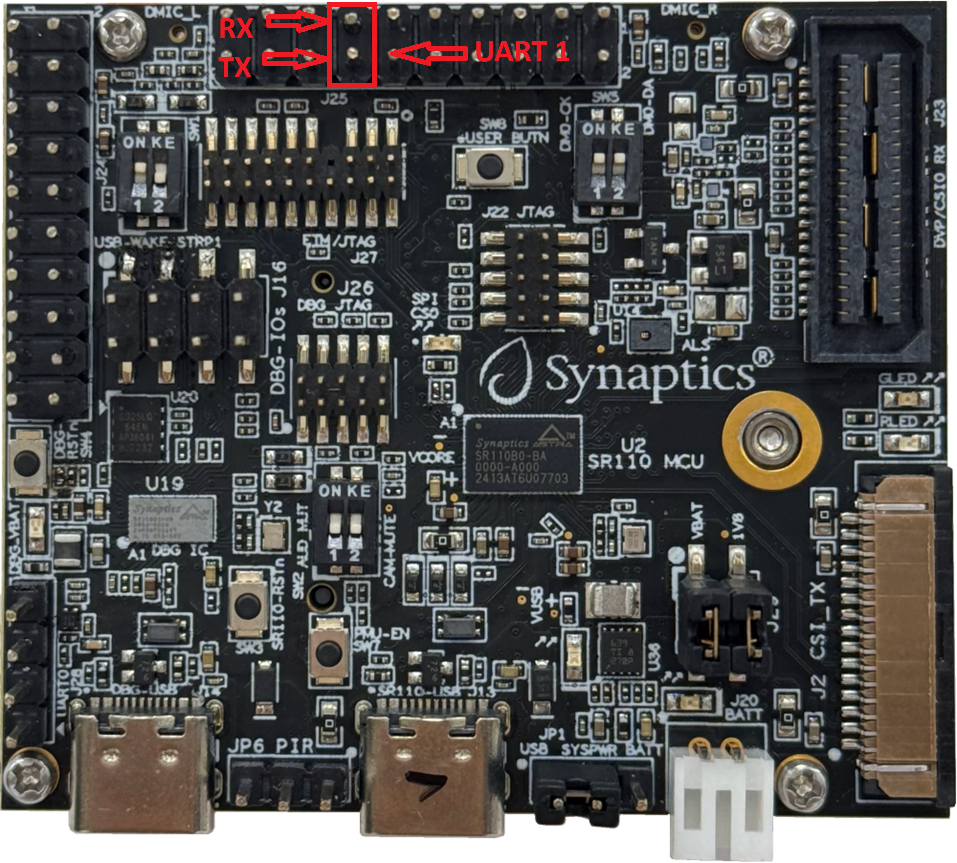
UART1 logger/CLI bridge
Connect UART bridge to UART1 interface pins on SR110 board.
Open serial terminal on the UART1 bridge COM port.
Reference image:
Building and Flashing the Example using VS Code
Use the VS Code flow described in the respective soc vscode guides and the VS Code Extension guide:
Build (VS Code):
Open Build and Deploy -> Build Configurations.
Select the wifi_sample_app project configuration in the Project Configuration dropdown.
Build with Build (SDK+Project) for the first build, or Build (Project) for rebuilds.
Flash (VS Code):
Use Image Conversion to generate the flash image.
Use Image Flashing (SWD/JTAG) to flash the firmware image.
Building and Flashing the Example using CLI
Use the CLI flow described in the respective build guide:
Build (CLI):
Build from the application directory itself:
cd <sdk-root>/examples/driver_examples/wifi_sample_app
export SRSDK_DIR=<sdk-root>
make <app_defconfig> BUILD=SRSDK
For faster rebuilds when only app code changes, reuse the app-local installed SDK package:
cd <sdk-root>/examples/driver_examples/wifi_sample_app
export SRSDK_DIR=<sdk-root>
make build
If this app has been exported to its own repository, use the same commands from that exported app directory after setting
SRSDK_DIRto the SDK root.
Build outputs (CLI):
Application binary:
<app-dir>/out/<target>/release/<target>.elfApp-local SDK package:
<app-dir>/install/<BOARD>/<BUILD_TYPE>/
Flash (CLI):
Activate the SDK venv (required for image generation tools):
# Linux/macOS
source <sdk-root>/.venv/bin/activate
# Windows PowerShell
.\.venv\Scripts\Activate.ps1
Generate the flash image:
cd <sdk-root>/tools/srsdk_image_generator
python srsdk_image_generator.py \
  -B0 \
  -flash_image \
  -sdk_secured \
  -spk "<sdk-root>/tools/srsdk_image_generator/Inputs/spk_rc4_1_0_secure_otpk.bin" \
  -apbl "<sdk-root>/tools/srsdk_image_generator/Inputs/sr100_b0_bootloader_ver_0x012F_ASIC.axf" \
  -m55_image "<sdk-root>/examples/driver_examples/wifi_sample_app/out/sr110_cm55_fw/release/sr110_cm55_fw.elf" \
  -flash_type "GD25LE128" \
  -flash_freq "67"
Flash the firmware image:
cd <sdk-root>
python tools/openocd/scripts/flash_xspi_tcl.py \
  --cfg_path tools/openocd/configs/sr110_m55.cfg \
  --image tools/srsdk_image_generator/Output/B0_Flash/B0_flash_full_image_GD25LE128_67Mhz_secured.bin \
  --erase-all
Running the Application using VS Code Extension
Press RESET on the board after flashing.
For logging output, click SERIAL MONITOR and connect to the UART1 bridge port.
Use UART bridge adapter connected to UART1 (GPIO 24/23) for logger output
The logger port is not guaranteed to be consistent across OSes. As a starting point:
Windows: try the lower-numbered COM port first.
Linux/macOS: try the higher-numbered port first.
If you do not see logs after a reset, switch to the other port.
WiFi sample app logs appear in the logger window, including initialization status and diagnostic results.
Running the Application
Identify the UART bridge COM port on your PC.
On Windows, check Device Manager -> Ports (COM & LPT) after plugging the USB-to-UART bridge.
Use that COM port in your serial terminal.
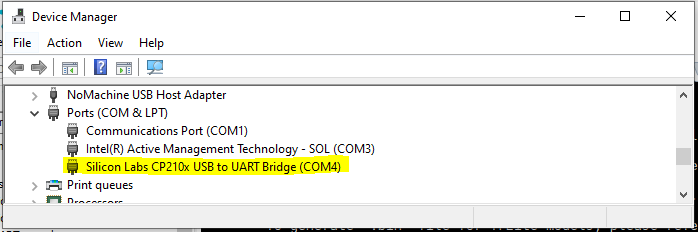
Connect UART bridge to UART1 and open a serial terminal.
Flash Wi-Fi sample app image and press RESET.
Confirm boot logs appear on UART1 terminal.
Run below CLI commands in order:
wifiup sdio_ps 0
wifiup init
wifiup insmod
wl mpc 0
wl isup
wl wnm 0
ifup_wifi sta <Wi-Fi AP SSID> 1 <Pass Phrase>
wifiup status
Expected Logs
System Initialization:
0000000193:[0][INF][SYS ]:Application drivers initialization complete without errors.

0000004383:[0][INF][SYS ]:------------------------------------------

0000007745:[0][INF][SYS ]:            Hello  ASTRA

0000011107:[0][INF][SYS ]:------------------------------------------

0000014474:[0][INF][SYS ]:System initialization done

0000017075:[0][INF][SYS ]:sr110 SDK version 1.4.0

0000019555:[0][INF][SDIO]:SDIO Init Success

0000021751:[0][DBG][HAPI]:------------------------------------------

0000025113:[0][DBG][HAPI]:       Host API Router task

0000028480:[0][DBG][HAPI]:------------------------------------------

0000031847:[0][INF][HAPI]:Active interface is USB

0000034313:[0][INF][GENR]:Usecase manager service started.

0000037198:[0][DBG][HAPI]:A new service was registered, service ID: 6.

000000000.112:vTaskShell_demo, 276

000000000.113:vTaskShell_demo, 281

000000001.013:vTaskShell, 294
wifiup sdio_ps 0:
000000011.091:recv cmd 16:wifiup sdio_ps 0

0011116201:[0][DBG][UART]:shell_CommandWifiUp:  sdio_ps, inited 0, loaded 0
wifiup init:
000000020.526:recv cmd 11:wifiup init

000000020.528:netif_add,

000000020.529:sys_mbox_new mbox created 0x300152b8, 256

000000020.532:sys_thread_new enter tcpip_thread

000000020.534:sys_thread_new enter, 1

000000020.536:mhd_register_os_api, 14:37:32

000000020.538:mhd_register_sdio_dev, 14:37:35, 0x33f94cac, 0x33f94cac, 0x300134c8

0020664616:[0][INF][SDIO]:SDIO Init Success

0020666731:[0][INF][SDIO]:SDIO Host Init Success

0020674167:[0][INF][SDIO]:Driver Strength Register: 0x00001007

0020677746:[0][INF][SDIO]:SDIO device initialized successfully on instance 50MHz 1

0020677774:[0][INF][SDIO]:SDIO IO Device Init Success

0020677798:[0][INF][SDIO]:SDIO Initialization Complete
wifiup insmod:
000000030.478:recv cmd 13:wifiup insmod

0030503258:[0][DBG][UART]:shell_CommandWifiUp:  insmod, inited 1, loaded 0

0030503286:[0][DBG][UART]:wifi_reg_on: 1004

000000030.680:mhd_bus_init, 256, 15:14:08, May 26 2025


0030705844:[0][DBG][UART]:set bs fn 2, size 256

000000030.685:mhd_wifi_get_chip_info, 223, 10414612


000000030.687:[WiFi] Chip Info: ID=4612 REV=1

000000030.690:[WiFi] Chip Soc: TYPE=1 PKG=4

000000030.696:sig offset 384:557401, fw size 557393

000000030.698:[Metadata]mhd_is_metadata_present: Metadata is PRESENT

000000030.701:[Metadata]mhd_get_metadata_ver: Metadata Version: 0x1

000000030.705:[Metadata]mhd_get_metadata_size: Jump value:0x7d (125 bytes)

000000030.708:

000000030.709:CHIP DETAILS

        Type:           0x 1

        Length:         0x 9

        Version:        0x 1

        Chip ID:        4612a1

000000030.714:FW EXCLUSIVE MEMORY REGION DETAILS

        Type:           0x 2

        Length:         0x e

        Version:        0x 1

        Memory start:   0x1b0000

        Memory End:     0x1c0000

        Memory Size:    0x10000 (65536 bytes)

000000030.723:STARTUP LOCATION DETAILS

        Type:           0x 3

        Length:         0x 6

        Version:        0x 1

        Offset:         0x1c0000

000000030.728:NVRAM LOCATION DETAILS

        Type:           0x 4

        Length:         0x e

        Version:        0x 1

        NVRAM Start:    0x29d300

        NVRAM End:      0x29fdf8

        NVRAM Max Size: 0x2af8 (11000 bytes)

000000030.737:CONSOLE ADDR DETAILS

        Type:           0x 5

        Length:         0x 6

        Version:        0x 1

        Console addr:   0x1ff450

000000030.742:FW SECTION DOWNLOAD LOCATION DETAILS

        Type:           0x 6

        Length:         0x1c

        Version:        0x 1

        No. of Sections:        2

000000030.748:          Section 1:

                DL Start:       0x1c0000

                DL End:         0x1fdc2e

                DL Size:        0x3dc2e (252974 bytes)

000000030.753:          Section 2:

                DL Start:       0x252f50

                DL End:         0x29d300

                DL Size:        0x4a3b0 (304048 bytes)

000000030.759:TAG-INFO LOCATION DETAILS

        Type:           0x 7

        Length:         0x 6

        Version:        0x 1

        Address:        0x4a3b00029fdf8

000000030.764:CLM BLOB LOCATION DETAILS

        Type:           0x 8

        Length:         0x 6

        Version:        0x 1

        Address:        0x242f50

000000030.770:[Metadata] Metadata End Reached!

000000030.772:mhd_bus_sdio_download_firmware, [WiFi] Firmware Download

000000030.776:download_resource, 001c0000, 557813

000000030.778:download_resource, 944 001c0000, 252974

000000030.904:offset 252974

000000030.906:download_resource, 944 00252f50, 304048

000000031.058:offset 557022

000000031.060:mhd_bus_sdio_download_firmware, [WiFi] Nvram Download

000000031.063:[WiFi] Wlan RAM size: configured[f0000], calculated[f0000]

000000031.067:download_resource, 0029d300, 5022

000000031.070:sig offset 384:557401

000000031.072:mhd_download_rtlv, 001bfe78, 384

000000031.075:mhd_download_rtlv, 001bfe70, 0

000000031.077:mhd_bus_sdio_download_firmware, [WiFi] Clm Download

000000031.080:download_resource, 00242f50, 7202

000000031.086:[WiFi] HT CLK Actived [0]

000000031.088:mhd_bus_init, 455


000000031.731:[WiFi] Function 2 Ready

000000031.732:[WiFi] SR Enabled

000000031.734:[WiFi] Chip Specific Init

000000031.736:[WiFi] Wlan Bus Up

000000031.738:mhd_thread_init, 184


0031762986:[0][DBG][UART]:posix_rtos_init_semaphore, 976, 0x30016910

0031763013:[0][DBG][UART]:posix_rtos_init_semaphore, 976, 0x30016970

0031763039:[0][DBG][UART]:posix_rtos_init_semaphore, 976, 0x300169d0

0031764068:[0][DBG][UART]:posix_rtos_init_semaphore, 976, 0x30016a30

0031764094:[0][DBG][UART]:posix_rtos_init_semaphore, 976, 0x30016a90

0031764121:[0][DBG][UART]:posix_rtos_init_binary_semaphore, 984, 0x30016af0

0031764147:[0][DBG][UART]:posix_rtos_init_binary_semaphore, 984, 0x30016b50

000000031.841:host_rtos_get_mhdtask_settings, 121, 2560, 40

000000031.843:[WiFi] mhdTask priority[40] stack[0x340e1c0c] stack_size[2560]

0031870819:[0][DBG][UART]:posix_rtos_create_thread, 958, 0x300175b8, 1

0031871065:[0][DBG][UART]:posix_rtos_create_thread, 958, 0x30017a30, 1

000000032.040:[MKD IOCTL] max_time=186

000000032.042:[WiFi] Set GMode

000000032.044:mhd_module_init, 172


000000032.046:mhd_module_init, 188


000000032.049:[WiFi] MHD: 1.10.1f 40:D9:5A:43:9F:06

000000032.052:[WiFi] 256: wl0: Apr 24 2025 12:03:18 version 18.44.48 (g9336d700) FWID 01-0


000000032.057:[WiFi] Disable roaming mode
wl mpc 0:
000000039.822:recv cmd 8:wl mpc 0

wl_iovar_int, name mpc, set 263, 0x30008c7f
wl isup:
000000048.174:recv cmd 7:wl isup

1
wl wnm 0:
000000061.562:recv cmd 8:wl wnm 0

wl_iovar_int, name wnm, set 263, 0x30008c7f
ifup_wifi sta 5G_asus 1 1234567890:
000000068.992:recv cmd 34:ifup_wifi sta 5G_asus 1 1234567890

0069020494:[0][DBG][UART]:shell_CommandIfUp, sta, 5G_asus, 1, 1234567890

0069023627:[0][DBG][UART]:posix_rtos_init_semaphore, 976, 0x30017aa0

000000071.874:event from idx 0, type 69, status 8, reason 0, flags 0

000000071.878:chanspec 0000e02a

000000071.885:event from idx 0, type 69, status 8, reason 0, flags 0

000000071.888:chanspec 0000e02a

000000075.049:event from idx 0, type 69, status 0, reason 0, flags 0

000000075.052:[WiFi] AP Found -

000000075.054:  SSID     : 5G_asus


000000075.055:  BSSID    : 7C:10:C9:03:57:0C

000000075.058:  Channel  : 36


000000075.059:  band     : 5


000000075.061:  Security : WPA2 PSK AES


000000075.063:[WiFi] Joining AP

0075089590:[0][DBG][UART]:posix_rtos_init_semaphore, 976, 0x30017aa0

000000075.069:mhd_wifi_set_passphrase, 1, 10, 1234567890

000000075.076:mhd_wifi_join_specific, 1079, 5, 0000d024

000000075.084:mhd_wifi_join_specific, 1097, 0 0x0

000000076.694:event from idx 0, type 3, status 0, reason 0, flags 0

000000076.697:-- JOIN Event (type 3 status 0 reason 0)

000000076.700:event from idx 0, type 16, status 0, reason 0, flags 1

000000076.703:-- JOIN Event (type 16 status 0 reason 0)

000000076.709:event from idx 0, type 46, status 6, reason 0, flags 0

000000076.712:-- JOIN Event (type 46 status 262 reason 512)

000000076.731:event from idx 0, type 0, status 0, reason 0, flags 0

000000076.734:-- JOIN Event (type 0 status 0 reason 0)

000000076.737:[WiFi] Join successfully ! sta_is_link_up=1
wifiup status:
000000082.577:recv cmd 13:wifiup status

0082605054:[0][DBG][UART]:shell_CommandWifiUp:  status, inited 1, loaded 1

0082605082:[0][DBG][UART]:softap not up

0082610183:[0][DBG][UART]:sta connection info ......

0082610207:[0][DBG][UART]:ssid : 5G_asus

0082610229:[0][DBG][UART]:bssid: 7c:10:c9:03:57:0c

0082610258:[0][DBG][UART]:ch   : 36

0082610280:[0][DBG][UART]:rate : 108

0082610303:[0][DBG][UART]:rssi : -22dbm