XSPI Sample Application
Description
This XSPI flash sample application demonstrates initialization, JEDEC ID detection, erase, read, and write operations on an external SPI-NOR flash device. It measures read/write throughput across different I/O widths and modes (SDR), while validating data integrity and logging performance results under FreeRTOS.
Prerequisites
Choose one setup path:
Building and Flashing the Example using VS Code
Use the VS Code flow described in the SL2610 guides and VS Code Extension guide:
Build (VS Code):
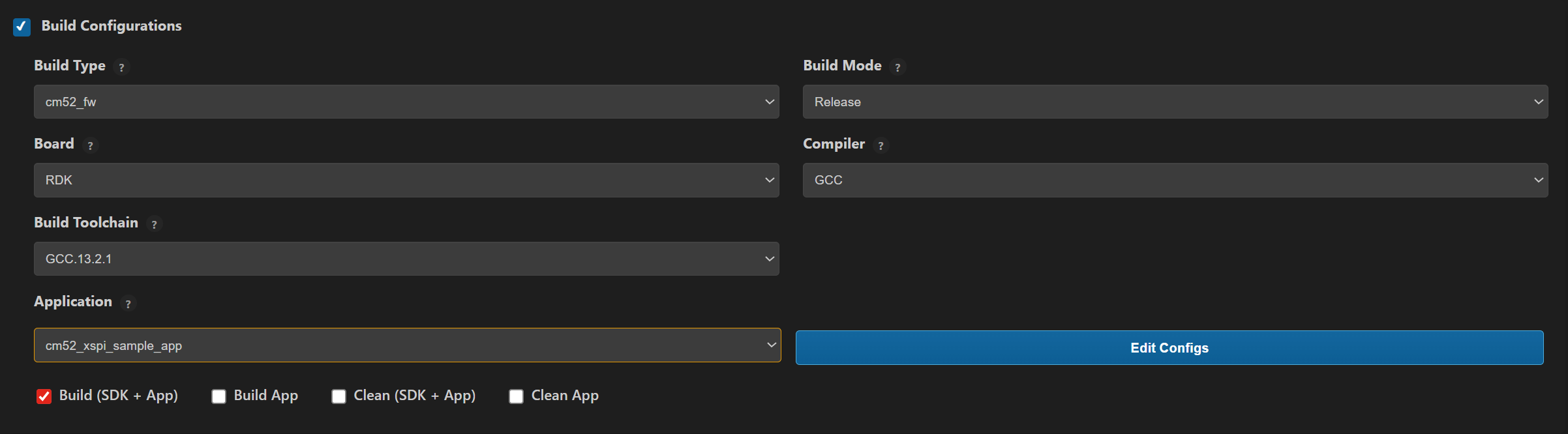
Open Build and Deploy -> Build Configurations.
Select
cm52_xspi_sample_app_rdkin the Application dropdown.Build with Build (SDK + App) for the first build, or Build App for rebuilds.
Flash/Image Generation (VS Code):
Note: On Windows, use WSL for SL2610 image generation.
Build the SL2610 bootloader image.
Open SL2610 Image Generation, select the generated application ELF, and click Run.
This is equivalent to
make imagegenand directly generates the system sub-image.
Flash/download the MCU image to target.
Building and Flashing the Example using CLI
Use the CLI flow described in the SL2610 Platform Guide:
Build (CLI):
Build the SL2610 bootloader from SDK root:
make sl2610_bootloader_rdk_defconfig BOARD=SL2610_RDK
make
Build XSPI sample app from
<sdk-root>/examples:cd <sdk-root>/examples export SRSDK_DIR=<sdk-root> make cm52_xspi_sample_app_defconfig BOARD=SL2610_RDK BUILD=SRSDK
Image Generation and Flash (CLI):
Note: On Windows, use WSL for SL2610 image generation. In WSL, ensure required tools are installed: Python,
make, and Arm GNU toolchain. You can use the VS Code extension’s Tools Installer in WSL, or follow Linux Environment guide for CLI setup.
Build the SL2610 bootloader image.
Generate the system sub-image:
cd <sdk-root>/examples
export SRSDK_DIR=<sdk-root>
make imagegen
Flash/download image to target.
Running the Application using VS Code Extension
Power the board and press RESET after flashing.
For logging output, connect UART to the target and open a serial console (for example, MobaXterm).
XSPI sample logs appear in the serial window.
Expected Logs
# BL: MCU Init...
Init DDR4 @ 3200
DHL:v0p40 PT:v0p40 ID:0x21010000
USB MOUNTED
0000000000:[0][WRN][LOGR]:Changing logger interface to LOGGER_IF_UART_0
0000000000:[0][INF][SYS ]:Application drivers initialization complete without errors.
0000000000:[0][INF][SYS ]:sl2610 SDK version 1.3.0
0000000000:[0][INF][FLSH]:Starting XSPI Sample Application...
0000000005:[0][INF][FLSH]:Starting Flash Initialization Test...
0000000012:[0][INF][FLSH]:[FLASH] Init successful
0000000017:[0][INF][FLSH]:Flash Initialization Test Passed.
0000000022:[0][INF][FLSH]:Starting Read Device ID Test...
0000000027:[0][INF][FLSH]:[FLASH] JEDEC ID: 0x1860C8 (MFG=0xC8)
0000000033:[0][INF][FLSH]:Read Device ID Test Passed.
0000000038:[0][INF][FLSH]:Starting Read/Write Throughput Test...
0000000043:[0][INF][FLSH]:Flash RW throughput test started
0000000049:[0][INF][FLSH]:Testing throughput: IO=1-bit, Mode=SDR
0000000054:[0][INF][FLSH]:[FLASH] RW throughput test (IO=1-bit, Mode=SDR)
0000000061:[0][INF][FLSH]:Configuring XSPI instance 0 for DIRECT mode with IO=1, DTR=0
0000000069:[0][INF][FLSH]:flash_erase: addr=0x0, len=0x200
0000000074:[0][INF][XSPI]:Erase 4k @ 0x0
0000000108:[0][INF][FLSH]:[FLASH] Write: 512 bytes in 4 ms
0000000114:[0][INF][FLSH]:[FLASH] Read : 512 bytes in 1 ms
0000000119:[0][INF][FLSH]:[FLASH] RW throughput test passed
0000000124:[0][INF][FLSH]:Throughput test PASSED: IO=1-bit, Mode=SDR
0000000130:[0][INF][FLSH]:Testing throughput: IO=4-bit, Mode=SDR
0000000136:[0][INF][FLSH]:[FLASH] RW throughput test (IO=4-bit, Mode=SDR)
0000000143:[0][INF][FLSH]:Configuring XSPI instance 0 for DIRECT mode with IO=4, DTR=0
0000000151:[0][INF][FLSH]:flash_erase: addr=0x0, len=0x200
0000000156:[0][INF][XSPI]:Erase 4k @ 0x0
0000000188:[0][INF][FLSH]:[FLASH] Write: 512 bytes in 4 ms
0000000194:[0][INF][FLSH]:[FLASH] Read : 512 bytes in 1 ms
0000000199:[0][INF][FLSH]:[FLASH] RW throughput test passed
0000000204:[0][INF][FLSH]:Throughput test PASSED: IO=4-bit, Mode=SDR
0000000211:[0][INF][FLSH]:Flash RW throughput test completed, final status=0
0000000217:[0][INF][FLSH]:Read/Write Throughput Test Passed.
0000000223:[0][INF][FLSH]:All Flash Tests Completed Successfully.
0000000229:[0][INF][FLSH]:XSPI Sample Application Completed Successfully